Nova AI Chat
Nova AI Chat is a smart assistant integrated into NoteX, designed to help users deeply explore AI-processed content from various formats—recordings, documents, images, and web links.
Once the notes are generated by AI, Nova becomes your main tool to ask questions, extract information, and generate new content quickly and effectively.
Key Benefits:
- Context-aware Q&A, no need to reread the entire note.
- Instant content creation: to-dos, emails, blogs, etc.
- Smart information extraction: action items, timelines, involved people, etc.
- Compatible with multiple formats: audio, documents, images, links.
- Great for both work and learning: summarizing, reporting, sharing.
1. UI & User Experience
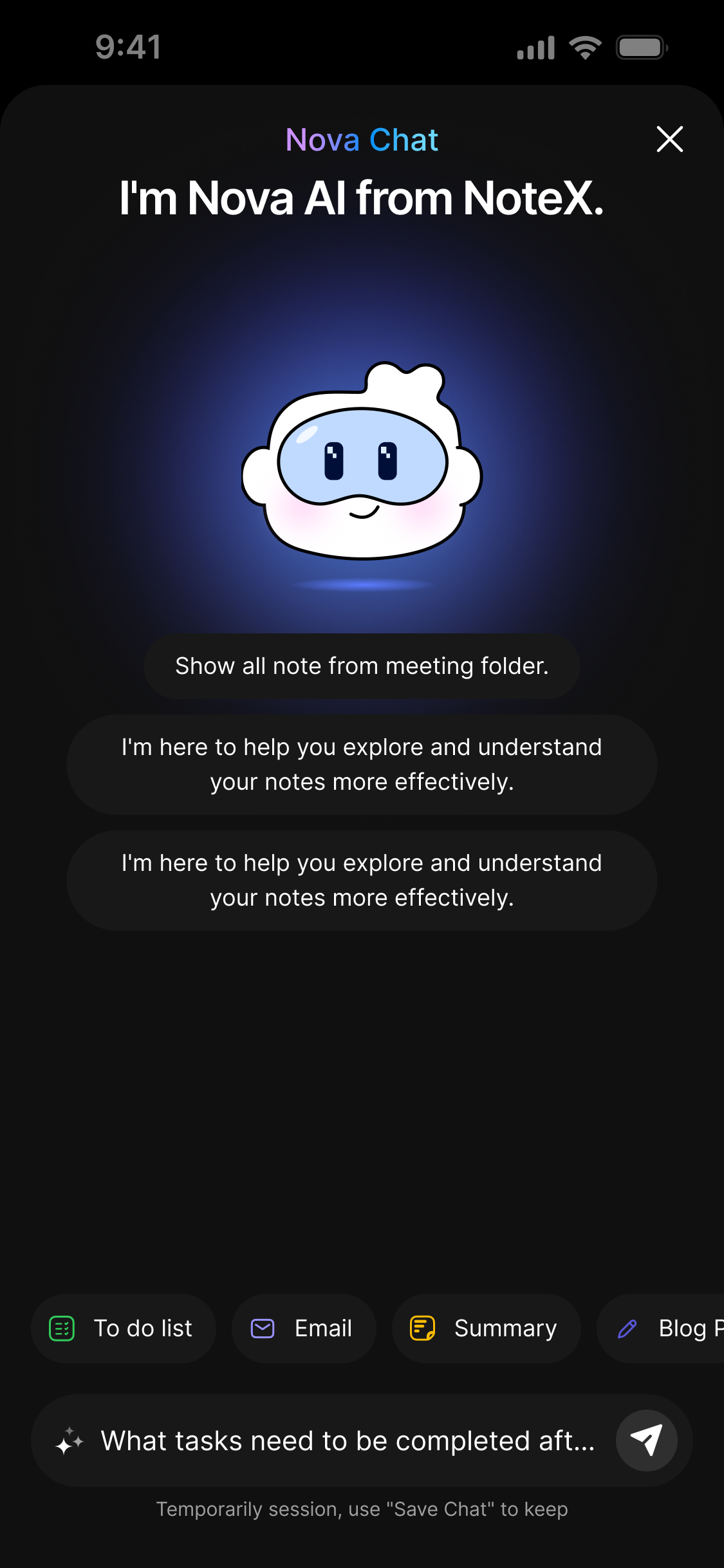
UI specification ai chat screen
How to Access Nova
Open any note that has been processed by AI in NoteX and go to the Nova Chat tab to start interacting.
Screen Components
| Component | Type | Description |
|---|---|---|
| Greeting Message | Text | Introduction message: "I'm Nova AI from NoteX." |
| Quick Suggestions | Button Group | Suggested prompts like “Show all notes from this folder” |
| Prompt Input Bar | Text Field | Where you type your question or request |
| Popular Shortcuts | Buttons | Predefined actions like To-do, Email, Blog Post, etc. |
| Response Area | Output Panel | Displays Nova’s reply with interaction buttons |
| Action Buttons | Function Buttons | Allow you to save, copy, or share the AI response |
2. How to Use
Step 1: Open an AI-processed note
After NoteX has completed generating the note, Nova is ready to help.
Step 2: Type a request or choose a shortcut
Enter your prompt in the input bar, or tap a shortcut such as Summary or To-do list.
Step 3: View Nova’s Response
Nova will analyze your note and return a tailored reply.
You can:
- Tap 💾 Save Chat
- Tap 📋 Copy Result
- Tap 🔗 Share Output
Nova works best with clear and specific prompts.
4. Supported Prompt Templates
Nova includes built-in optimized prompts for different needs:
| Purpose | Sample Prompt |
|---|---|
| 📚 Outline | “Create an outline from this content. Use ## for main topics and ### for subtopics.” |
| ✅ Action Items | “List all action items with Task / Owner / Deadline format.” |
| ✍️ Blog Post | “Turn this into a blog post with an engaging title, clear sections, and a conclusion.” |
| 📩 Recap Email | “Write a professional recap email with subject, greeting, key points, and next steps.” |
| 📈 Project Update | “Summarize project updates: progress, challenges, resources, and timeline.” |
| 💼 LinkedIn Post | “Create a LinkedIn post with a hook, insights, CTA, and hashtags.” |
| 🐦 Twitter Thread | “Generate 3–5 tweets under 280 characters each (numbered 1/4, 2/4, etc.).” |
| 📰 Newsletter | “Turn this into a newsletter with title, intro, 2–4 main sections, and call to action.” |
3. Notes & Tips
| Use Case | Example Prompt |
|---|---|
| Ask for info | “What were the key points from my last meeting?” |
| Create content | “Write a blog post from this transcript with 3 insights.” |
| Extract tasks | “List tasks with owners and deadlines from this discussion.” |
| Quick summary | “Summarize this in 3 key bullet points.” |
| Get suggestions | “Based on this plan, what should I do next?” |
4. Interacting with Nova’s Responses
Below Each AI Response
| Action Button | Function |
|---|---|
| 💾 Save Chat | Saves the full session for later reference |
| 📋 Copy | Copies the entire AI-generated response |
| 🔗 Share | Shares the response via other apps or platforms |
If you don't tap “Save Chat,” the session will be lost when the app is closed.
Interacting with Your Own Prompts
- Long-press on your submitted prompt to reveal the Copy option for reuse or tweaking.
5. Important Notes
- Nova does not auto-save – always tap “Save Chat” to keep your content.
- The clearer and more specific your prompt, the better Nova performs.
- Nova only works with notes that have already been processed by AI.
6. FAQ
Can Nova work with any file?
No. Nova is only available for notes that have already been processed by AI.
Will my chat be lost if I exit the app?
Yes, unless you save the chat, the session will be cleared.
Can I ask Nova to summarize just a portion of the note?
Yes. Just specify or highlight the section you want summarized.
Does Nova work offline?
No. Nova requires an internet connection to function.