Translate
1. Overview
The Translate feature allows you to quickly and accurately translate content in a Summary into multiple languages. This tool is especially useful when you want to share information with international users, learn foreign languages, or support multilingual work and study needs.
2. How to Use
- Open the note containing the Summary you want to translate.
- Click the
Morebutton at the top-right corner of the interface. - Select
Translate Notefrom the list of options.

Click the Translate button to translate your note into multiple languages
- Choose the target language from the list of supported languages.
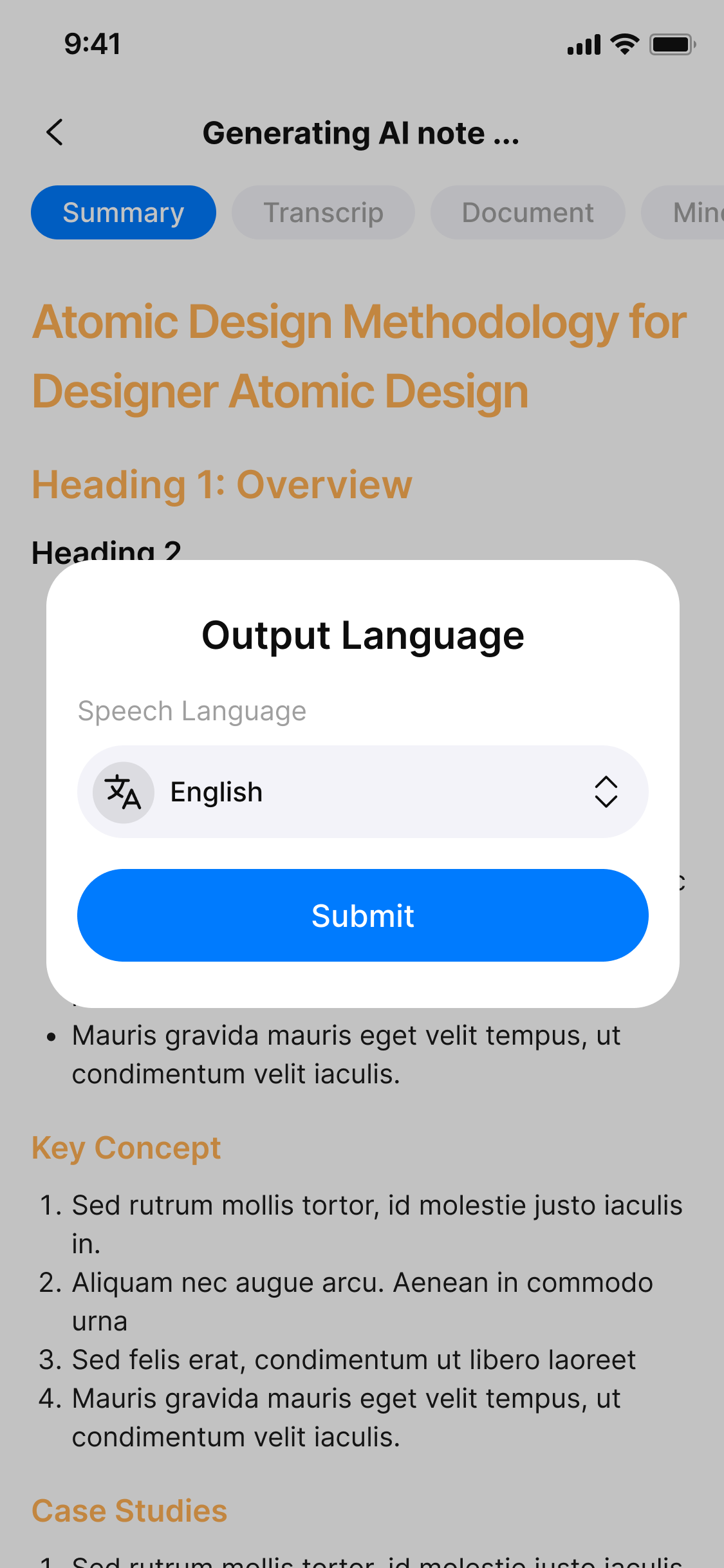
Choose the language you want the note to be translated into
-
Click
Submit. -
Wait for the system to process: The content will be automatically translated and displayed in a separate interface.
3. Benefits
- ✅ Fast: Translate content within seconds.
- ✅ Multilingual support: Suitable for global users.
- ✅ Convenient: No need to leave the app to use external translation tools.
- ✅ Flexible application: Ideal for learning, working, and international sharing.
4. Notes
- Some languages may not be fully supported, and translation quality may vary depending on context.
- You can view both the original and translated versions for easy comparison.
- For longer content, translation may take a few seconds to complete.
5. FAQ
1. What content can be translated?
The Translate feature works on the Summary content of a note.
2. How do I translate a note?
Open the note, click the More button (top-right corner), select Translate Note, choose the target language, and click Submit.
3. Which languages are supported?
A wide range of popular languages are supported; you can choose from the provided list in the interface.
4. How long does translation take?
Translation usually completes within seconds, but longer content may take a bit more time.
5. Can I see the original and translated text side by side?
Yes, the system allows you to view both versions for easy comparison.
6. Is the translation always accurate?
Translation quality depends on the language and context; some languages or technical terms may not translate perfectly.
7. Can I edit the translated text?
Currently, the translated text is displayed separately; you may copy and edit it externally as needed.
8. Does the Translate feature require internet access?
Yes, translation is performed by an online AI system, so internet connection is needed.
9. Can I translate transcripts or only summaries?
Currently, only Summary content can be translated.
10. What if the translation fails or is incomplete?
Try again after a few moments. If the problem persists, contact support for assistance.