Flashcard
NoteX uses AI to automatically analyze your content and generate Flashcard sets, consisting of concise question-answer pairs based on your original material.
Each flashcard has two sides:
- A question side (typically a definition or concept).
- An answer side with a short explanation.
Key Benefits:
- Automatically transforms knowledge into quick Q&A for effective review.
- Saves time – no need to manually create flashcards.
- Flexibly adjust number, difficulty, and topic of flashcards to suit your learning needs.
1. UI/UX Specification
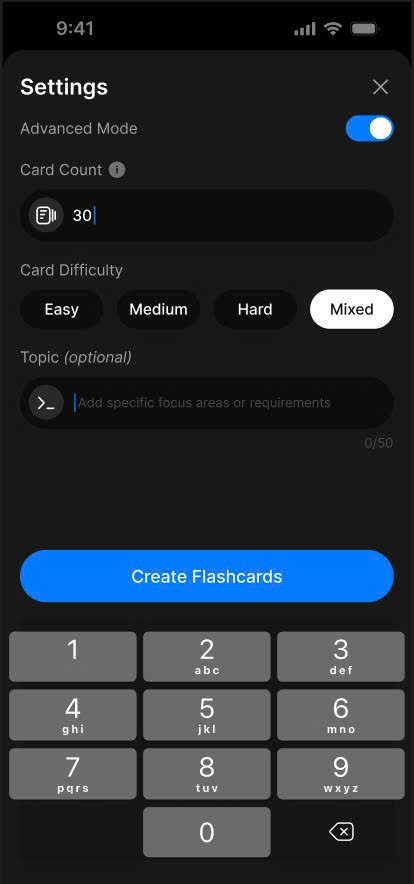
Flashcard Create
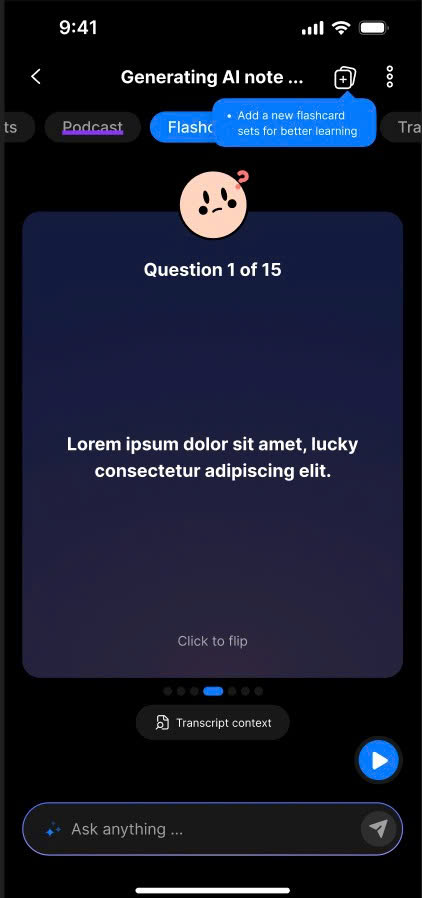
Flashcard Detail
2. How to Use
Create a Flashcard Set
- In Note Detail, open the Flashcard tab.
- Tap Create Flashcard.
- A Bottom Sheet will appear (default mode: Advanced ON).
- Enter the following (optional):
- Number of flashcards.
- Difficulty level.
- Topic (optional).
- Tap Create Flashcard in the bottom sheet.
- Wait for the AI to process and generate the flashcard set.
Create Additional Flashcard Sets
- In Note Detail, tap the Add More icon in the App Bar to open the Flashcard Sets screen.
- Tap Create Flashcard.
- A Bottom Sheet will appear (default mode: Advanced ON).
- Enter the following (optional):
- Number of flashcards.
- Difficulty level.
- Topic (optional).
- Tap Create Flashcard in the bottom sheet.
- Wait for the AI to process and generate the new set.
3. Notes & Tips
- You can create multiple flashcard sets for a single note to review from different perspectives.
- Try different difficulty levels to challenge and deepen your memory.
- Flashcards can be manually edited after automatic generation to personalize learning.
4. FAQ
Can I edit the flashcards after they’re created?
Yes, you can manually edit any flashcard once it's generated.
Can I create multiple flashcard sets for one note?
Yes, NoteX supports multiple distinct flashcard sets per note.
What does the flashcard difficulty level mean?
It determines the complexity of the questions – from basic recognition to applied or synthesized knowledge.
Do I have to come up with questions and answers myself?
No, NoteX’s AI generates the questions and answers automatically from your note content.
Can I share flashcards with others?
Yes, flashcard sets can be easily shared using NoteX’s sharing features.