Quiz
After processing your note content, NoteX automatically generates Quiz sets to help you review your understanding and retention.
Quizzes are usually in the form of multiple-choice or true/false questions, based on your original note content. This allows you to practice recalling information and self-assess your learning progress.
Key Benefits:
- Automatically turns knowledge into quizzes for self-testing.
- Supports multiple question types: multiple choice, true/false.
- Fully customizable: number of questions, difficulty level, and topic.
1. UI/UX Specification

Quiz Create
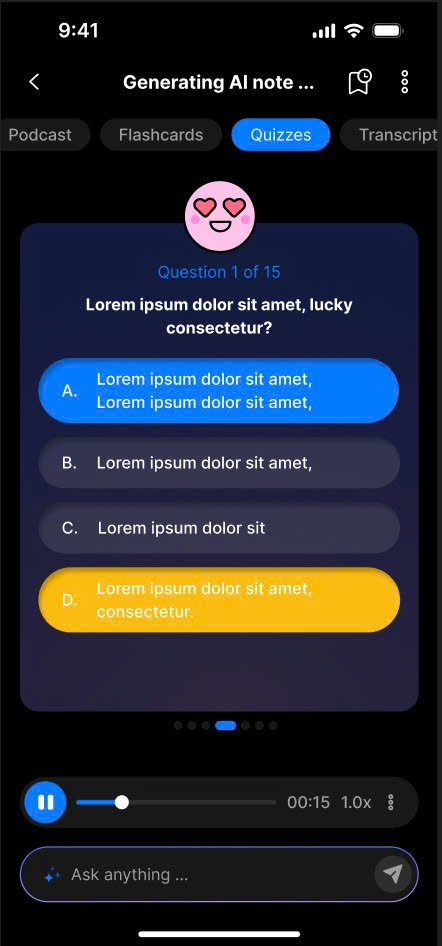
Quiz Detail
2. How to Use
Create a Quiz Set
- In Note Detail, open the Quizzes tab.
- Tap Create Quizzes.
- A Bottom Sheet will appear (default mode: Advanced ON).
- You can enter:
- Number of quizzes to generate
- Difficulty level
- Topic (optional)
- Tap Create Quizzes in the bottom sheet.
- Wait for the AI to generate the quiz set.
Create Additional Quiz Sets
- In Note Detail, tap the Add More icon in the App Bar to open the Quiz Sets screen.
- Tap Create Quizzes.
- A Bottom Sheet will appear (default mode: Advanced ON).
- You can enter:
- Number of quizzes to generate
- Difficulty level
- Topic (optional)
- Tap Create Quizzes in the bottom sheet.
- Wait for the AI to complete the process.
3. Notes & Tips
- You can generate multiple quiz sets from the same note for varied practice.
- Try different difficulty levels to train for deeper thinking and better recall.
- After generation, you can manually edit quiz questions and answers to personalize them.
4. FAQ
Can I create multiple quiz sets for a single note?
Yes, NoteX supports generating multiple quiz sets per note.
How does the difficulty level affect the quiz?
Difficulty level determines how complex the questions are—from basic recall to advanced application.
Can I edit the quizzes after they're created?
Yes, you can fully edit both questions and answers after generation.
What question formats are supported in quizzes?
Mainly multiple-choice and true/false questions.
Can I share the quizzes with others?
Yes, you can share quiz sets easily with friends or study groups via NoteX’s sharing features.