Logout or Delete Account
The Logout feature allows you to safely sign out of your current account on the NoteX app, while Delete Account lets you permanently remove your account and all related data from the system.
Suitable when you want to secure your account or stop using the app.
Benefits
- Secure your account when switching devices
- Ensure privacy if sharing your device
- Permanently remove your data if you no longer wish to use the app
- Easy access through in-app account options
1. UI/UX Specification
Tap your account info in Settings
| Component | Type | Description |
|---|---|---|
| Avatar in Home Screen | Button/Icon | Tap to open Settings menu |
| Account Section (Top) | Button | Shows your name and email – tap to view account options |
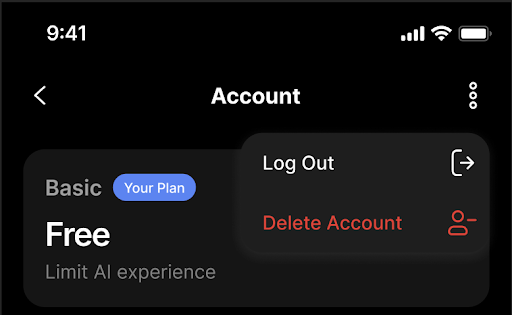
| Three-Dot Menu | Icon/Button | Located at the top right of Account screen |
| Logout Option | Menu Item | Tap to log out from the app |
| Delete Account Option | Menu Item | Tap to delete your account and all associated data |
| Confirmation Dialog | Modal | Asks for final confirmation before logging out or deleting the account |
2. How to Use
Step 1: Open Settings
- From the main screen, tap the avatar in the top left corner (where your greeting and profile picture appear).
Step 2: Go to Your Account
- In the Settings screen, tap on the first section (with your name and email).
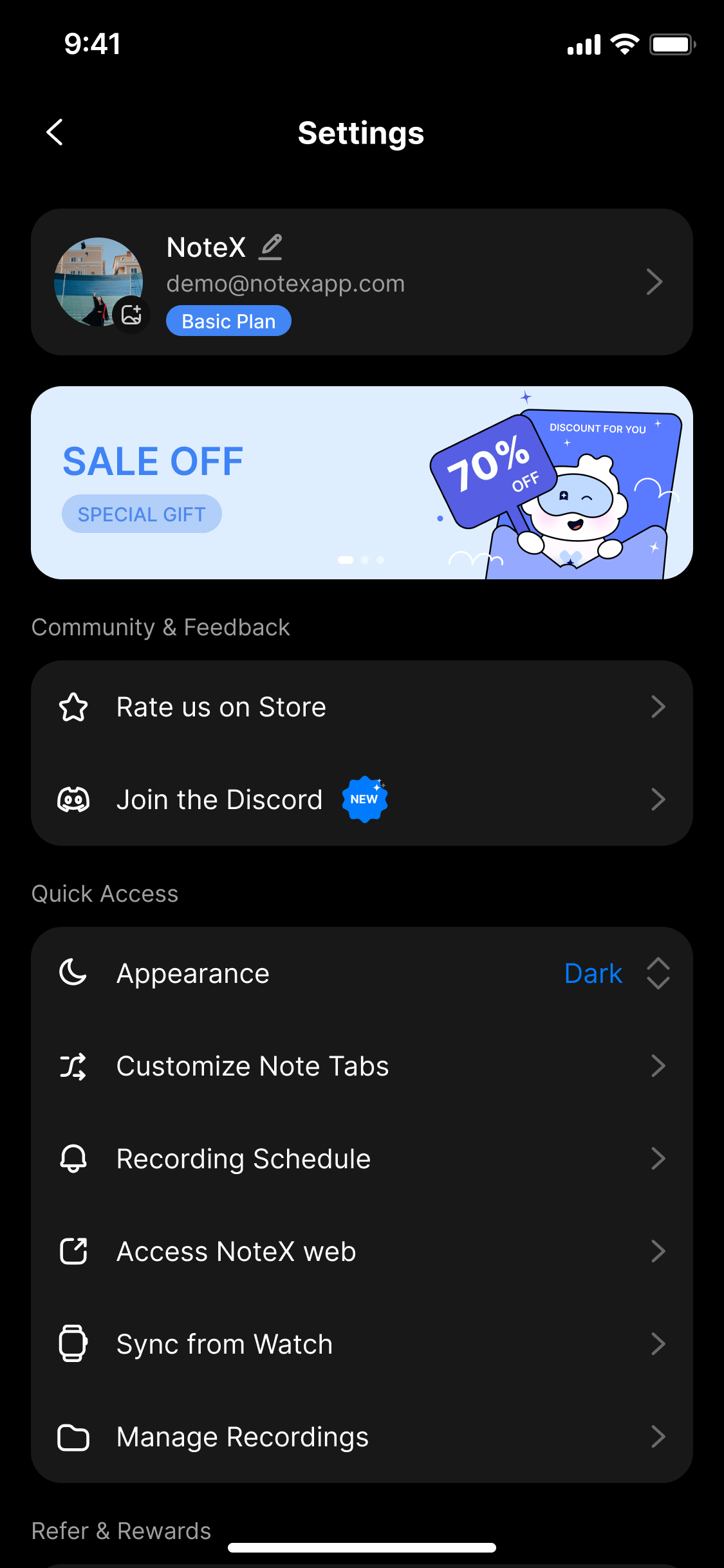
Tap on your account info at the top of the Settings
Step 3: Access Advanced Options
- Tap the three-dot icon at the top right corner of the "Account" screen.
Use the top-right menu to log out or delete account
Step 4: Choose Your Action
- Tap Log Out to sign out of your account.
- Tap Delete Account to permanently delete your account.
Step 5: Confirm Your Action
A confirmation dialog will appear:
-
Log out?
“Are you sure you want to log out?”
→ Tap Log Out to confirm, or Cancel to go back. -
Delete account?
“This action cannot be undone. Deleting your account will permanently remove all your notes and recordings.”
→ Tap Delete to confirm, or Cancel to cancel.
3. After Completing the Action
| Action | Result |
|---|---|
| Log Out | You’ll be redirected to the app’s login screen. |
| Delete Account | Your account and all data will be permanently removed. |
4. Notes & Tips
- Deleted data cannot be recovered.
- Make sure to back up important content if necessary.
- An internet connection is required for these actions.
You can always log back in if you only choose Log Out.
With Delete Account, this action is irreversible.
5. FAQ
Will logging out delete my data?
No. Logging out only signs you out temporarily. Your notes and data remain saved and linked to your account.
Can I undo Delete Account?
No. Once confirmed, deletion is permanent. Your notes, recordings, and user data will be erased from our servers.
Can I delete my account from the web?
Currently, account deletion is only available within the mobile app.
I accidentally deleted my account — can I recover it?
Unfortunately, no. Data recovery is not possible after deletion. This action is irreversible by design for privacy compliance.
What if I see an error when trying to log out or delete?
Please check:
- You are connected to the internet
- You are using the latest version of the app
If the issue persists, contact:
Email: hello@notexapp.com