Referral
The Referral feature enables users to earn additional credits by inviting friends to join the application and redeeming referral codes from other users. This mutual reward system provides both referrers and new users with bonus credits to access premium AI features and enhance their note-taking experience.
Key Benefits
- Mutual rewards system: Both referrer and referred users receive bonus credits upon successful registration
- Credit accumulation: Earn credits that can be used for AI note generation and premium features
- Simple sharing process: Share personalized referral codes through multiple channels (email, social media, messaging)
- Easy redemption: Quick code entry system for claiming referral rewards
- Usage tracking: Comprehensive overview of earned, used, and available credits
- Lifetime opportunity: Potential entry into monthly contests for lifetime premium access
1. UI/UX Specification
Screen Components
- Refer & Rewards section: Main settings category containing referral-related functions
- Referral page: Step-by-step guide with personalized referral code display
- Code entry dialog: Input field for redeeming referral codes with validation
- Credit bottom sheet: Detailed breakdown of referral statistics and credit usage
- Share interface: Native platform sharing integration for code distribution
- Copy functionality: One-tap code copying with haptic feedback and confirmation
User Experience Flow
- Section access: Clear categorization within settings for easy discovery
- Guided process: Visual step-by-step instructions for effective referral sharing
- Code management: Prominent display of personal referral code with copy functionality
- Redemption workflow: Streamlined code entry with real-time validation
- Credit monitoring: Transparent tracking of earnings and expenditures
Navigation Path
Home Screen → Avatar Icon ( Settings ) → Refer & Rewards Section
2. How to Use
Step 1: Access Referral Features
- Launch the application and navigate to the Home screen
- Tap the Avatar icon located in the top-left corner to open Settings
- Locate the Refer & Rewards section in the settings list
- Choose from three available options: Referral, Enter Referral Code, or Referral Credits
Step 2: Share Your Referral Code
- Tap Referral to open the referral guide page
- Review the three-step process explanation: Copy, Share, Earn
- Locate your unique 8-character referral code in the highlighted container
- Tap the copy icon next to your code to copy it to clipboard
- Tap Refer Now to open the native sharing interface
- Choose your preferred sharing method (email, social media, messaging apps)
- The app automatically includes your code and invitation message
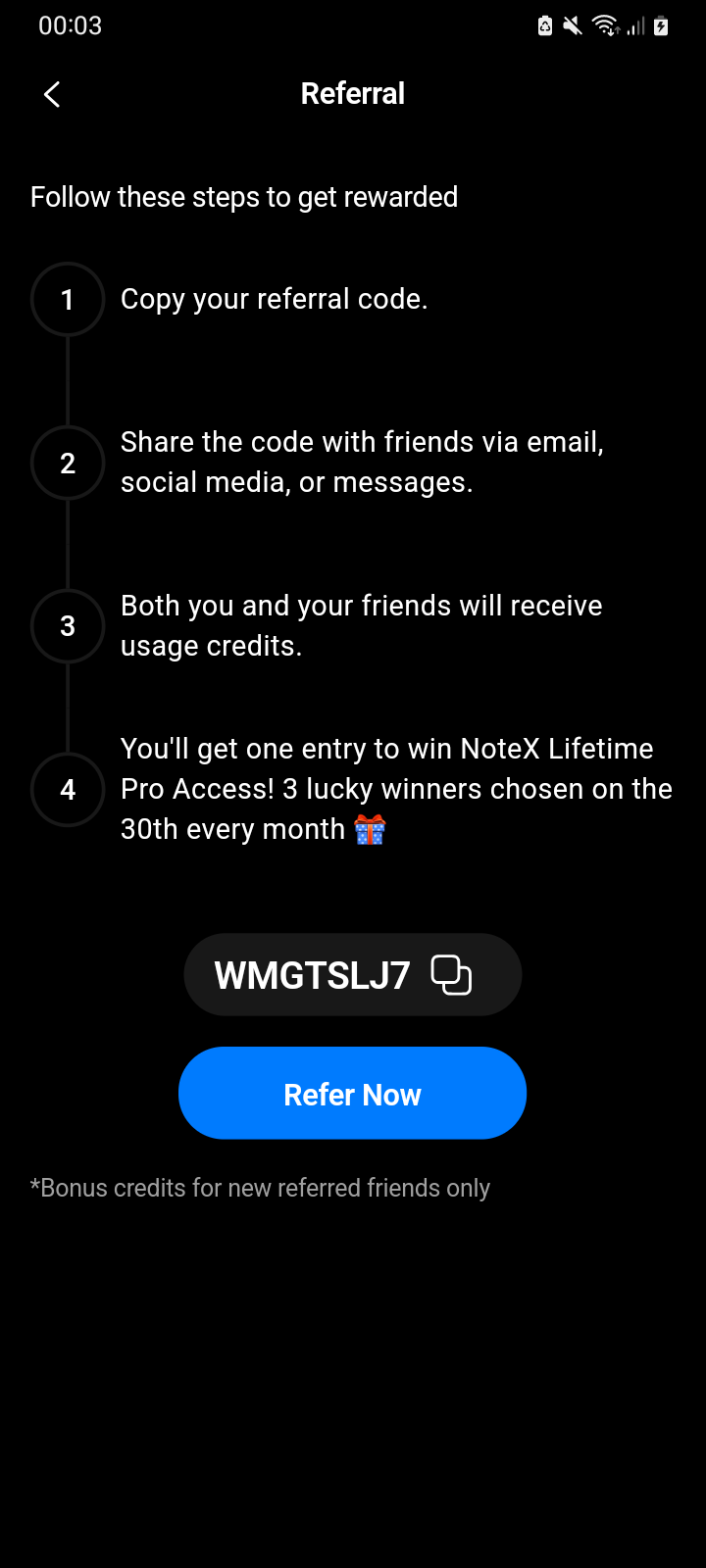
Personal referral code and sharing options on the referral guide page
Step 3: Enter Someone Else's Referral Code
- From the Refer & Rewards section, tap Enter Referral Code
- In the dialog that appears, enter the 8-character referral code
- Ensure the code contains only uppercase letters and numbers
- Observe real-time validation (red border indicates invalid format)
- Tap Redeem when the code is valid and properly formatted
- Receive confirmation message showing credited amount
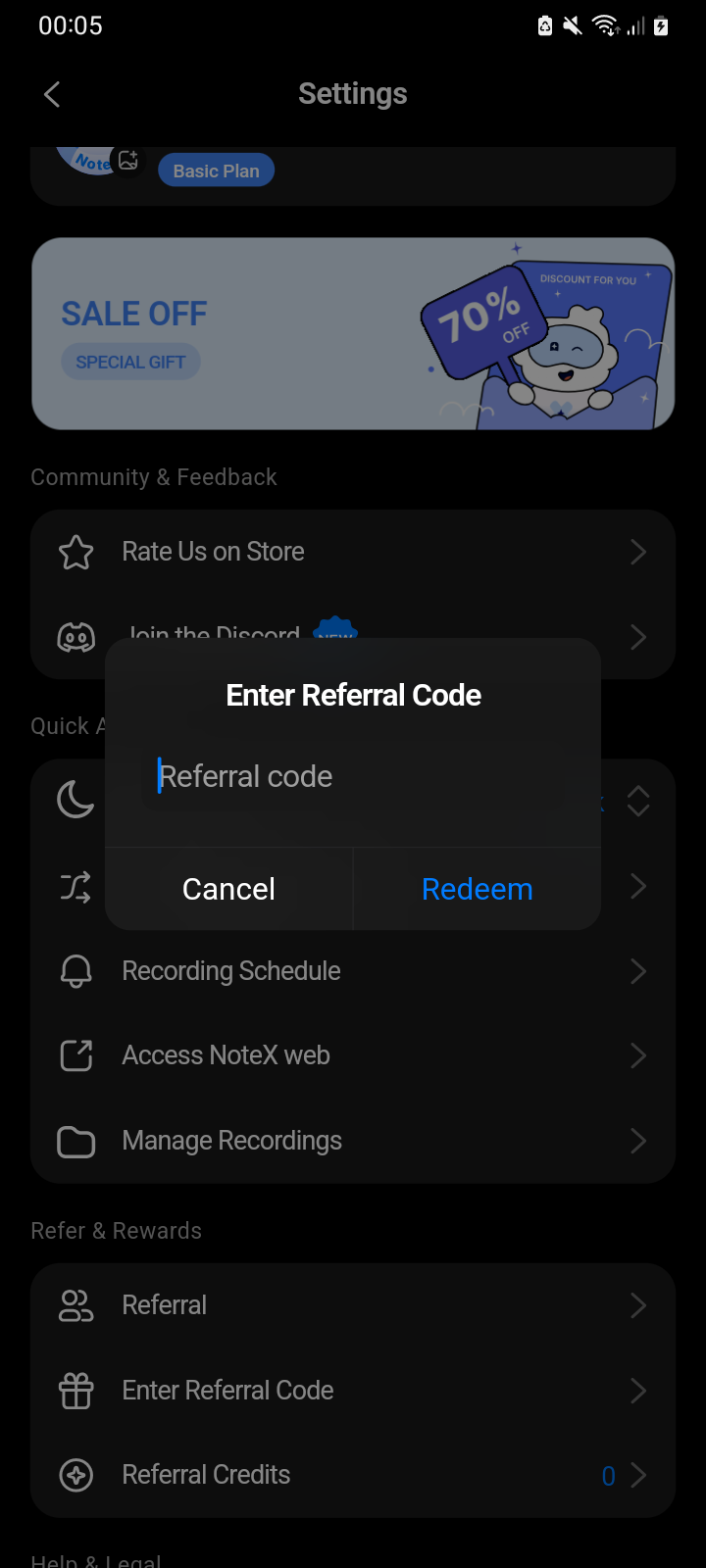
Referral code entry dialog with real-time validation and redeem button
Step 4: Monitor Your Referral Credits
- Tap Referral Credits to view detailed credit information
- Review the credit breakdown showing:
- Available Credits: Current usable credit balance
- Your Referrals: Number of successful friend invitations
- Credits Earned: Total credits accumulated through referrals
- Credits Used: Total credits spent on AI note generation
- Pull down to refresh data and sync latest referral information
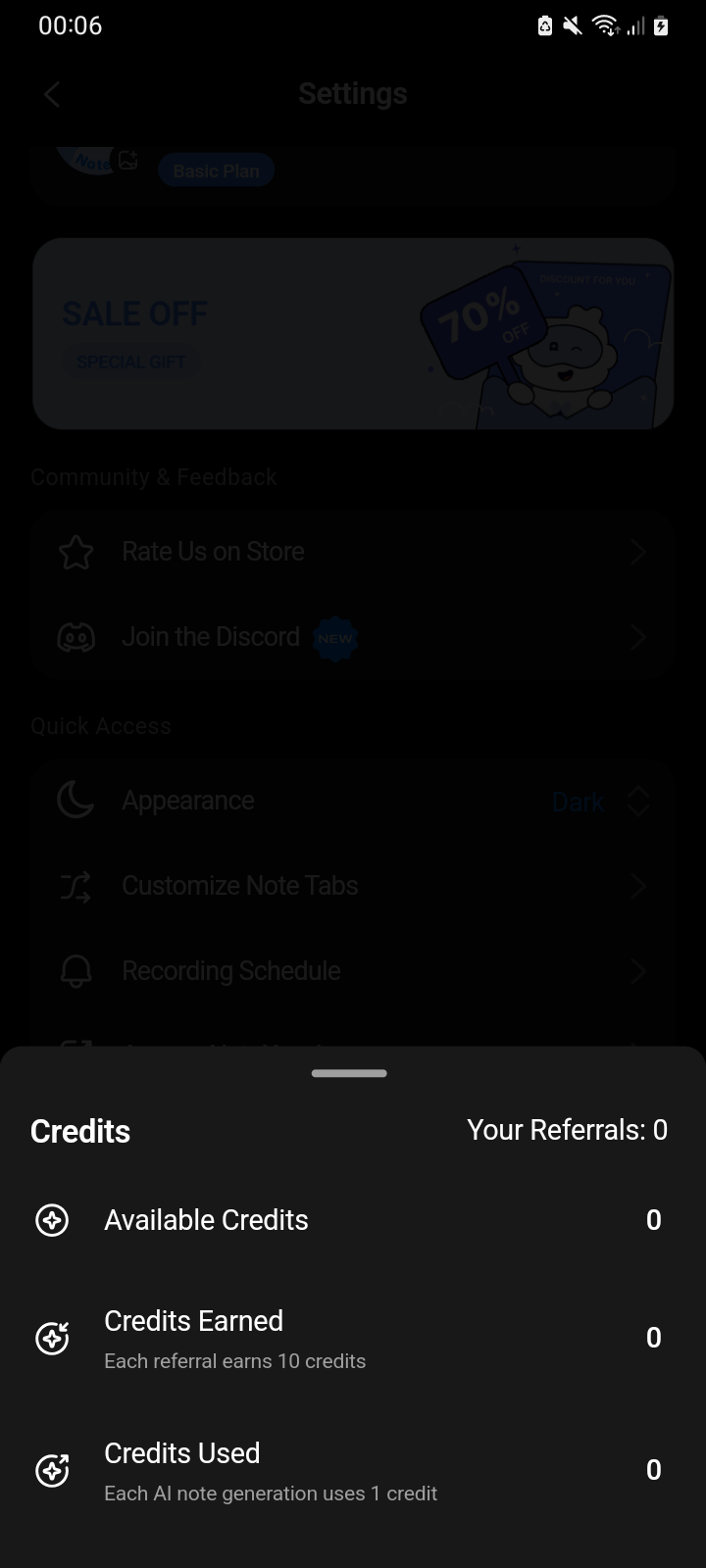
Detailed view of available, earned, and used referral credits
Step 5: Track Credit Usage
- Monitor how credits are earned (each successful referral)
- Understand credit consumption (1 credit per AI note generation)
- Plan referral activities based on usage patterns and available credits
- Use the "Refer Now" button for quick access to sharing options
3. Notes & Tips
Referral Code Requirements
- Format specification: Codes must be exactly 8 characters long
- Character set: Only uppercase letters (A-Z) and numbers (0-9) are valid
- Case sensitivity: Codes are automatically converted to uppercase during entry
- Uniqueness: Each user receives a unique, permanent referral code
Credit System Mechanics
- Referrer rewards: Users earn credits for each friend who successfully joins using their code
- Referred rewards: New users receive bonus credits upon registration with a valid code
- Credit usage: Each AI note generation consumes 1 credit from available balance
- Rollover policy: Unused credits remain available indefinitely (no expiration)
Sharing Optimization
- Multiple channels: Use various platforms (email, social media, messaging) to maximize reach
- Personal touch: Add personal messages to increase conversion rates
- Timing consideration: Share during periods when friends are likely to try new productivity apps
- Follow-up: Check credit balance periodically to track successful referrals
Special Opportunities
- Monthly contests: Each successful referral provides entry into contests for lifetime premium access
- Pro user visibility: Referral section only appears for non-Pro users to encourage upgrades
- Bonus limitations: Credits are awarded only for new users, not existing accounts
4. FAQ
Getting Started & Access
I can't find the Refer & Rewards section in my Settings.**
The Refer & Rewards section is only visible to non-Pro users. If you have an active Pro subscription:
- The referral features are hidden to focus on premium features
- Consider sharing your experience with friends even without earning additional credits
- Referral functionality may return if your Pro subscription expires
Where can I find my referral code?**
Your referral code is available in multiple locations:
- Main referral page: Settings → Refer & Rewards → Referral
- Referral dialogs: Automatic popups may display your code during certain actions
- Account synchronization: Your code is permanent and synced across all devices
My referral code isn't showing up.**
Code display issues typically indicate:
- Poor connectivity: Ensure stable internet connection for code retrieval
- Account sync problems: Try logging out and back in to refresh account data
- App version issues: Update to the latest app version for proper functionality
- Solution: Restart the app and check internet connectivity before trying again
Sharing & Code Management
How do I share my referral code effectively?**
Optimize your sharing strategy:
- Use the built-in sharing: Tap "Refer Now" for pre-formatted messages with your code
- Personal networks: Start with close friends and family who trust your recommendations
- Multiple platforms: Share across email, social media, and messaging apps
- Add context: Explain how the app has helped you to encourage sign-ups
Can I customize the referral message when sharing?**
The app provides a pre-formatted message that includes:
- Engaging introduction about the app's productivity benefits
- Your unique referral code
- App download link
- You can add personal touches before sending through your chosen platform
What happens if someone uses my referral code multiple times?**
Referral codes are designed for single use per person:
- Each new user can only use one referral code during registration
- Multiple attempts by the same user won't generate additional credits
- The system prevents abuse through account verification
Code Redemption & Validation
Why does my referral code entry show "Invalid code" error?**
Code validation requires specific formatting:
- Length requirement: Exactly 8 characters (no more, no less)
- Character restrictions: Only uppercase letters A-Z and numbers 0-9
- No special characters: Spaces, punctuation, or symbols cause validation failure
- Solution: Double-check the code format and try re-entering carefully
I entered a valid code but didn't receive credits.**
Credit delivery issues can occur due to:
- Already used code: Each code can only be redeemed once per account
- Self-referral attempt: Cannot use your own referral code
- Expired code: Some codes may have time limitations (24-hour expiry)
- Server processing delays: Credits may take a few minutes to appear
- Solution: Wait 5 minutes and refresh the credit display
Can I use multiple referral codes to get more credits?**
Referral code usage is limited:
- Each user account can only redeem one referral code
- Additional code entries will be rejected by the system
- Focus on sharing your own code to earn ongoing credits
What does "Referral code has expired after 24 hours" mean?**
Some referral codes have time-sensitive validity:
- Codes must be used within 24 hours of being shared in certain contexts
- Standard referral codes from the main page typically don't expire
- Solution: Ask for a fresh code from the referrer or use codes immediately upon receiving
Credit System & Tracking
How many credits do I earn per successful referral?**
Credit amounts vary but typically:
- Both referrer and referred user receive equal bonus credits
- The exact amount is displayed in your referral information
- Credit amounts may change based on promotional periods
- Check the "Credits Earned" section for current reward amounts
Why don't my credit numbers match between "earned" and "available"?**
Credit discrepancies are normal:
- Credits Earned: Total accumulated through all referrals
- Credits Used: Amount spent on AI note generation and features
- Available Credits: Remaining balance (Earned minus Used)
- The bottom sheet provides detailed breakdown of all transactions
Do my referral credits expire?**
Credit expiration policies:
- Referral credits typically do not expire
- Credits remain available for future use regardless of account activity
- Pro subscription status doesn't affect existing credit balance
- Credits can be used even after subscription changes
Can I convert referral credits to cash or other rewards?**
Referral credits are app-specific:
- Credits can only be used within the app for AI features
- No cash conversion or external reward redemption available
- Credits provide access to premium AI note generation capabilities
Technical Issues & Troubleshooting
The referral sharing feature isn't working on my device.**
Sharing functionality depends on device capabilities:
- iOS: Ensure sharing permissions are enabled for the app
- Android: Check that default apps are properly configured for sharing
- Network issues: Verify internet connectivity during sharing attempts
- Solution: Try sharing through different apps or restart the device
My referral statistics aren't updating.**
Data synchronization issues may cause delays:
- Manual refresh: Pull down on the credit screen to force update
- Network dependency: Ensure stable internet connection for data sync
- Server delays: Statistics may take up to 5 minutes to reflect changes
- Solution: Wait a few minutes and try refreshing again
The app crashes when I try to access referral features.**
Crashes typically indicate:
- Insufficient memory: Close other apps to free up device resources
- Outdated app version: Update to the latest version for stability improvements
- Corrupted data: Try logging out and back in to refresh account data
- Solution: Restart device and ensure adequate storage space
Policy & Limitations
Are there limits to how many people I can refer?**
Referral limitations:
- No upper limit: You can refer unlimited friends and family
- Quality focus: System prevents abuse through validation mechanisms
- Genuine referrals: Encouraged to share with people who will actively use the app
- Contest entries: Each referral provides additional entries for monthly contests
What happens to my referral credits if I upgrade to Pro?**
Pro subscription effects on referrals:
- Existing credits: Remain available and usable regardless of subscription status
- Referral interface: May be hidden during active Pro subscription
- Credit usage: Can still use accumulated credits for applicable features
- Future referrals: Referral earning may be restricted during Pro periods
Can I refer someone who previously had the app?**
Referral eligibility requirements:
- Codes are typically for new users only
- Users who previously deleted and reinstall may not be eligible
- System tracks account history to prevent duplicate rewards
- Focus: Target friends who haven't used the app before
Support & Advanced Issues
Who should I contact if referral features aren't working properly?**
Contact support through:
- Email: hello@notexapp.com (24/7 response within 24 hours)
- In-app support: Settings → Contact Support (includes automatic diagnostic information)
- Live chat: Available during business hours for urgent referral issues
What information should I provide when reporting referral problems?**
Include:
- Your unique referral code
- Specific error messages or screenshots
- Device model and operating system version
- App version number and last update date
- Details about the issue (sharing, redemption, credit tracking)
- Steps taken before encountering the problem